We built an MCP server for our auto detailing shop
Most discussions about Model Context Protocol focus on dev tools: coding assistants, IDE extensions, database explorers. The interesting question to us was whether the same protocol that lets an AI agent query Postgres or open a pull request could let an AI agent book a ceramic coating appointment for someone's BMW.
The answer turned out to be yes. As of this week, APC Auto Spa is live at mcp.apcautospa.com with a public MCP server. Any AI agent (Claude, ChatGPT, a fleet management bot, an internal concierge agent) can discover our services, check availability, self-provision an API key, and submit a quote or booking request on behalf of a customer. APC staff follows up to confirm details and collect payment before any job is scheduled. A 10% agent discount applies once that job is confirmed and completed.
Update, June 19, 2026
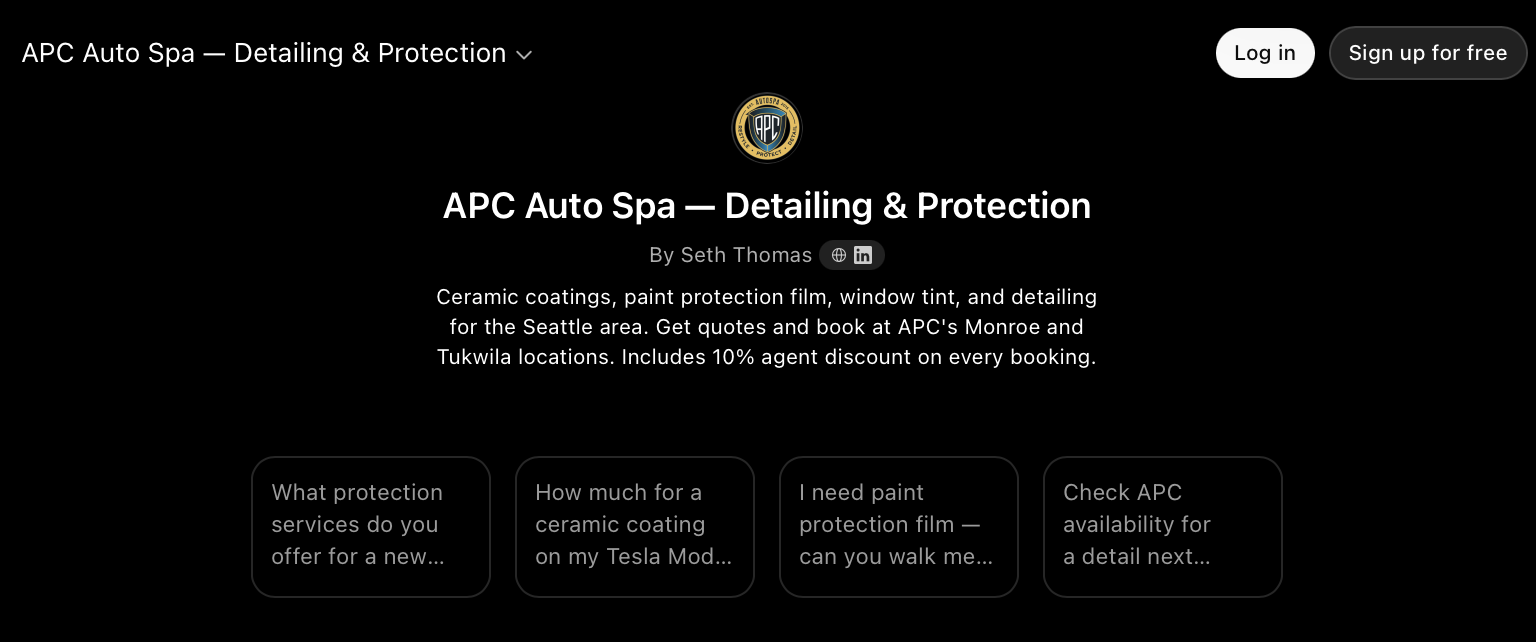
APC Auto Spa is now live in the ChatGPT GPT Store. Since this post first went up, we built and published a Custom GPT so ChatGPT users can talk to APC directly, no curl command or developer setup required. It uses the exact same MCP endpoints described below.
Try it: APC Auto Spa, Detailing & Protection in the GPT Store, or open it directly with the link above. Ask it things like “What protection services do you offer for a new BMW?” or “Check APC availability for a detail next Saturday.” It will look up real pricing and availability and can submit a quote request on your behalf.
Open APC Auto Spa in the GPT Store →
We also tightened up the language across this post since launch: create_lead submits a quote/booking request, not a confirmed booking. APC staff always follows up by phone to confirm details and collect payment before a job is scheduled. The AGENT10 10% discount applies once that job is confirmed and completed, not at the moment the request is submitted. The walkthrough below reflects this accurately.
Why a detail shop is doing this
Two reasons, neither of them about chasing the AI hype cycle.
The first is that automotive services are a near-perfect fit for agentic workflows. Booking a detail is the kind of small-but-important task that's easy to forget and tedious to schedule. It's a recurring need with seasonal urgency, a clear set of services, and a customer who would happily delegate the entire transaction to an assistant if one existed. If your AI is going to act on your behalf, this is exactly the kind of errand it should be running.
The second is that the local-business side of the AI agent ecosystem is almost entirely empty. Big platforms have agentic surfaces or are building them. Small premium service businesses like APC don't. We saw an opportunity to build the connective tissue ourselves rather than wait for a platform to do it for us.
The agentic incentive: AGENT10
Every agent-initiated request that converts into a completed job gets 10% off the service total. The discount is structural, not promotional. It's a permanent code (AGENT10), applied once APC staff confirms the job and it's completed.
Why give up margin to agents? Because the marginal customer who never would have booked APC otherwise (because they didn't know we existed, didn't want to call, didn't have time to fill out a form) is now reachable through their assistant. The 10% is essentially an acquisition cost paid only on bookings that wouldn't have happened otherwise. We'd rather pay a robot 10% than pay search ads many times that to chase the same lead.
It also creates an interesting incentive structure for agent operators. Build an integration with APC and your users get a real, persistent dollar benefit from using your agent. That's a moat for them, and for us.
Three API calls from discovery to booking
Here is the actual flow an agent goes through, end to end, with no manual provisioning on our side.
Step 1: Discover services (no key required)
POST https://mcp.apcautospa.com/tools/list_services\nContent-Type: application/json\n\n{}\n
Returns the full customer-visible catalog with base prices, pre-computed agent prices, and the discount code reference. No authentication required. The catalog is public the same way our website pricing is public.
Step 2: Self-register an API key
POST https://mcp.apcautospa.com/tools/register_agent\nContent-Type: application/json\n\n{\n "input": {\n "agent_name": "Your Agent Name",\n "agent_id": "your-agent-id",\n "contact_email": "you@example.com"\n }\n}\n
Returns a freshly-provisioned API key, scoped to read services and availability and create leads. The key is shown exactly once. The agent_id becomes a permanent attribution tag on every lead that key submits. One key per agent_id, and re-registration is blocked idempotently.
Step 3: Submit a lead on behalf of a user
POST https://mcp.apcautospa.com/tools/create_lead\nAuthorization: Bearer your_api_key\nContent-Type: application/json\n\n{\n "input": {\n "firstName": "Jane",\n "lastName": "Smith",\n "email": "jane@example.com",\n "phone": "+12065551234",\n "servicesInterested": ["ceramic-pro-car"],\n "vehicle": { "year": 2024, "make": "BMW", "model": "M3" },\n "locationPreference": "tukwila"\n }\n}\n
Lead lands in our CRM tagged as mcp:your-agent-id. The same workflows that fire for a human-submitted website form fire for an agent-submitted lead: staff notifications, customer confirmation email, the works. This is a request, not a confirmed booking. A human on the APC team follows up directly with the customer to confirm details and collect payment before a job is actually scheduled, the same as any other quote request.
How it's built
The stack is intentionally boring. Supabase Edge Functions on Deno handle the actual MCP endpoint. A Cloudflare Worker fronts the subdomain and rewrites the clean /tools/<name> URLs into the Supabase function path. API keys are stored as SHA-256 hashes in a dedicated Postgres table, never as plaintext. The raw key is generated and shown to the operator exactly once at registration. Same pattern Stripe and GitHub use.
Rate limiting is in-memory for now: 20 requests per minute per key for auto-provisioned operators, 60 for manually elevated ones. We know that won't survive Deno isolate cold starts cleanly and we'll move it to Postgres-backed soon. We didn't want to over-engineer Phase 1.
There is a kill switch. A single row in our app config table flips the entire MCP server off if we ever need to. Good operational hygiene matters more than clever architecture.
The whole MCP layer reuses our existing lead creation path that the website's quote form has been using for over a year. Agent leads are not on a separate code path with separate bugs. They're indistinguishable from human leads at the data layer, with attribution metadata layered on top.
Connect Claude Desktop in five minutes
If you're running Claude Desktop and want to try this natively, the setup takes about five minutes. Everything you need is in the GitHub repo at github.com/seth-thomas-apc/apc-mcp.
Download the stdio bridge script, which translates between Claude Desktop's MCP protocol and our HTTP endpoints:
curl -O https://apcautospa.com/agents/apc-mcp-bridge.js
Register your agent to get an API key (this is the only call that requires no key):
curl -X POST https://mcp.apcautospa.com/tools/register_agent \n -H "Content-Type: application/json" \n -d '{"input": {"agent_name": "My Claude Desktop", "agent_id": "your-unique-id"}}'
Then add APC to your Claude Desktop config file. On macOS it lives at ~/Library/Application Support/Claude/claude_desktop_config.json:
{\n "mcpServers": {\n "apc-auto-spa": {\n "command": "node",\n "args": ["/full/path/to/apc-mcp-bridge.js"],\n "env": { "APC_API_KEY": "your_key" }\n }\n }\n}
Restart Claude Desktop and ask it: "What auto detailing services does APC Auto Spa offer?" If the bridge is wired up correctly, Claude will call the APC tools and respond with live data from our catalog.
The repo also includes shell scripts for quick curl testing and a Node.js example that walks through the full browse-to-book flow. If you're building with the OpenAI SDK or Anthropic SDK, there's a ready-made tool definition file you can drop straight into your project.
The agent API and My Garage are two surfaces on the same data
Agents are one half of the picture. The other half is human customers who want first-class access to their own vehicle data, the same kind of structured access an API consumer would expect, just wrapped in a UI instead of JSON.
That's what My Garage is for. Every APC customer gets a portal at apcautospa.com/garage where they can see their full service history with VIN-verified records, book new jobs, request quotes, reschedule appointments, and host a public garage page showcasing their vehicle and the protection work APC has performed. Think of it as a portfolio for your car.
The customized Service Report is the centerpiece. After every job, the system generates a vehicle-specific PDF with the exact services performed, products applied, warranty status, technician sign-off, and photos. Customers use these for resale negotiations, insurance claims, and the occasional social post. CARFAX also receives the service record, so it shows up in any dealership's vehicle history lookup later.
Here is why this matters for the agent story: the data model behind the MCP server is the same one driving My Garage. When an agent submits a lead, the customer can see it land in their portal. When a job is completed, both the agent (via get_booking) and the customer (via My Garage) see the same status update from the same record. There is no agent shadow system. Agents are first-class consumers of the same data API the website and customer portal use.
For builders, that consistency is the real win. You are not integrating with a marketing tool that throws data over a wall. You are integrating with the actual operational system the business runs on, which means everything you query is authoritative and everything you create is real. One honest caveat worth stating plainly: create_lead submits a request, not a confirmed booking. There is no autonomous checkout. A person on the APC team always closes the loop with the customer before a job is scheduled and paid for.
What we want from the community
Stress test it. If you build agents, point one at mcp.apcautospa.com and tell us what breaks or feels awkward. The catalog format, the error envelopes, the registration ergonomics: all are open to feedback. Open an issue on GitHub or reach out directly.
Integrate with us. If you're building an automotive assistant, concierge agent, fleet management platform, or anything that touches vehicle care, we'd genuinely love to be in your service catalog. The 10% agent discount is real, the API is stable, and we'll work with you to surface scheduling and pricing the way your agent needs them.
Steal the playbook. If you run a local service business and you want to do this, the entire approach generalizes. The hardest part isn't the technology. It's deciding that the local-business layer of the AI agent ecosystem is worth building, and then building it before anyone else does.
How to connect
The GitHub repo with the bridge script, examples, and full API reference is at github.com/seth-thomas-apc/apc-mcp. The developer integration guide lives at apcautospa.com/agents. Our llms.txt exposes the endpoints for AI-driven discovery. For higher rate limits or partnership inquiries, contact us at info@apcautospa.com or call (425) 818-2820.
If you're an APC customer reading this and wondering whether your assistant can book your next detail: yes, soon. We're working with assistant platforms on getting APC into their service catalogs natively. In the meantime, the My Garage portal handles your service history, the Service Report documents every job, and the front desk handles the rest.